Your work Outlook won't sync to your iPhone — and IT won't turn it on
Every other guide tells you to check your settings or open a ticket. This is for the people who already did that and got told no.
Why the usual fixes don't apply to you
Search this problem and you'll find the same advice everywhere: re-add the account as Exchange rather than IMAP, toggle Calendars on, turn on Background App Refresh, reset the account. Those are good instructions — if the account is yours to configure.
They don't help when the block is a policy. If your company manages devices with Exchange ActiveSync rules or Intune and hasn't approved personal phones, no amount of toggling changes it. You're left with a work calendar you can only see on a laptop.
What that actually costs you
It isn't the inconvenience. It's the 2:00 call you join at 2:10, because the only reminder was a small banner on a laptop that was closed, or in an app whose notifications you turned off months ago because they were noisy. Your personal calendar — the one that actually gets your attention — has no idea the meeting exists.
The workaround: screenshot it
- Open the meeting in Outlook, on your laptop or the phone app.
- Take a screenshot.
- Open Snap to Calendar, tap Choose photo, and pick it.
- Check what it read — you see the event before anything is saved — and tap save.
Snap proposes the meeting details it recognizes for review. Check the start and end time, confirm any room or street address, and correct any dial-in details before saving. Once approved, choose the calendar and alert you want; a saved street address can be opened in Maps.
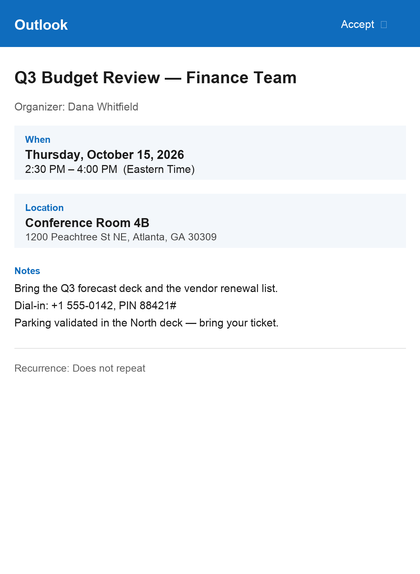
Input example only. Snap's proposed result varies with what it recognizes; review and correct every candidate detail against the invite before saving.
Is this allowed?
You're taking a picture of your own screen and typing the result into your own calendar faster. That said, company policies differ — if your employer restricts where meeting details may be copied, follow their rules. This is a convenience tool, not a way around a confidentiality obligation.
It works on more than Outlook
Try it on a clear Teams or Google invite, a message screenshot with event details, an appointment card, a printed sports schedule, or a school flyer. See the photo-to-calendar steps.
Stop retyping meetings into your personal calendar.
Free to try — your first 3 successful scans. No deadline, no account, no sign-up.
Download on the App StoreQuestions
Why won't my work Outlook calendar sync to my personal iPhone?
Most companies manage work accounts with Exchange policies or Intune. If your organisation hasn't allowed personal devices, adding the account either fails, forces device management you may not want, or syncs mail but not calendar. That is a policy decision on their side, not a setting you can fix on your phone.
Can I get my Outlook meetings into my iPhone calendar without IT's help?
Take a clear screenshot of the meeting invite and open it in Snap to Calendar. Review and correct the candidate date, start and end time, room or address, and notes it recognizes, then save only the event you approve.
Does this give my company access to my personal phone?
No. Nothing is connected to your work account. You are photographing a screen, exactly as you could with any camera, and the approved event is created locally on your device.
Will I get a proper alarm?
Once you approve and save an event to your iPhone calendar, you can choose a normal calendar alert instead of relying only on a work-app notification.